# Multi-exchange vol surface

Pulling a full BTC option chain across **Deribit, Binance, OKX, and Bybit** is a single SQL query — and once the data is in a DataFrame, four side-by-side vol surfaces, an ATM term-structure curve, and a single-expiry smile are all a short Plotly script away.

This article walks through the query and each plot. The full notebook is downloadable at the bottom.

## The query

```sql
WITH (
  SELECT max(timestamp)
  FROM api.option_chains
  WHERE underlying_asset = 'BTC' AND timestamp > now() - INTERVAL 30 MINUTE
) AS latest_ts
SELECT
  exchange,
  toDate(expiration)                                AS expiry,
  toFloat64(strike)                                 AS strike,
  toUInt32(date_diff('day', timestamp, expiration)) AS dte,
  toFloat64(mark_iv)                                AS iv,
  toFloat64(underlying_price)                       AS spot,
  toFloat64(abs(strike - underlying_price))         AS moneyness
FROM api.option_chains
WHERE underlying_asset = 'BTC'
  AND mark_iv != 0
  AND timestamp >= latest_ts - INTERVAL 5 MINUTE  -- snapshots refresh every 5 minutes
  AND dte BETWEEN 2 AND 150
ORDER BY exchange, expiry, strike
```

Three things worth noting:

* **No `WHERE exchange = …`** — the table holds every venue's snapshot at the same `timestamp` cadence, so omitting the exchange filter returns all four in one round-trip.
* **`timestamp >= latest_ts - 5 min`** — different exchanges' materialized views flush a few seconds apart. Widening the latest-snapshot anchor by one snapshot tick (5 minutes) catches all four venues' freshest data without doubling rows.
* **`dte BETWEEN 2 AND 150`** — server-side crop of same-day and far-dated expiries. Write it as `BETWEEN`: a chained `2 <= dte <= 150` parses in ClickHouse as `(2 <= dte) <= 150`, which is always true and silently disables the filter.

`underlying_price` (aliased `spot`) and `moneyness = abs(strike − underlying_price)` are computed server-side, so locating the at-the-money strike per expiry is a pure sort rather than a pandas step. The `toFloat64(...)` casts turn the `Decimal(38, 18)` columns into plot-ready floats in the query — no pandas `.astype(float)` needed. The IV column is already in consistent annualized-percent units across all four exchanges (see the [Option chain](/data/option-chain.md) page for the normalization detail).

## Interpolation onto a shared grid

Listed strikes differ across venues. To compare surfaces directly, interpolate each onto the same `(dte, strike)` grid. We also crop the strike axis to `[40k, 160k]` to drop deep-wing noise. It stays a client-side constant so you can re-tune the plotted band without re-issuing the query — but `spot` is already in the result set, so you could equally express this as a server-side `moneyness` filter.

```python
GRID_N = 80
STRIKE_MIN, STRIKE_MAX = 40_000, 160_000

df_f = df[df['strike'].between(STRIKE_MIN, STRIKE_MAX)]
x_grid = np.linspace(df_f['dte'].min(), df_f['dte'].max(), GRID_N)
y_grid = np.linspace(df_f['strike'].min(), df_f['strike'].max(), GRID_N)
xx, yy = np.meshgrid(x_grid, y_grid)

def surface_for(exchange):
    sub = df_f[df_f['exchange'] == exchange]
    pts = sub[['dte', 'strike']].to_numpy()
    vals = sub['iv'].to_numpy()
    z = griddata(pts, vals, (xx, yy), method='linear')
    z_fill = griddata(pts, vals, (xx, yy), method='nearest')
    return np.where(np.isnan(z), z_fill, z)
```

`griddata` with `method='linear'` produces NaNs outside the convex hull of each exchange's listed instruments; a second `'nearest'` pass fills those edges so the surface is plottable everywhere on the shared grid.

## The surfaces

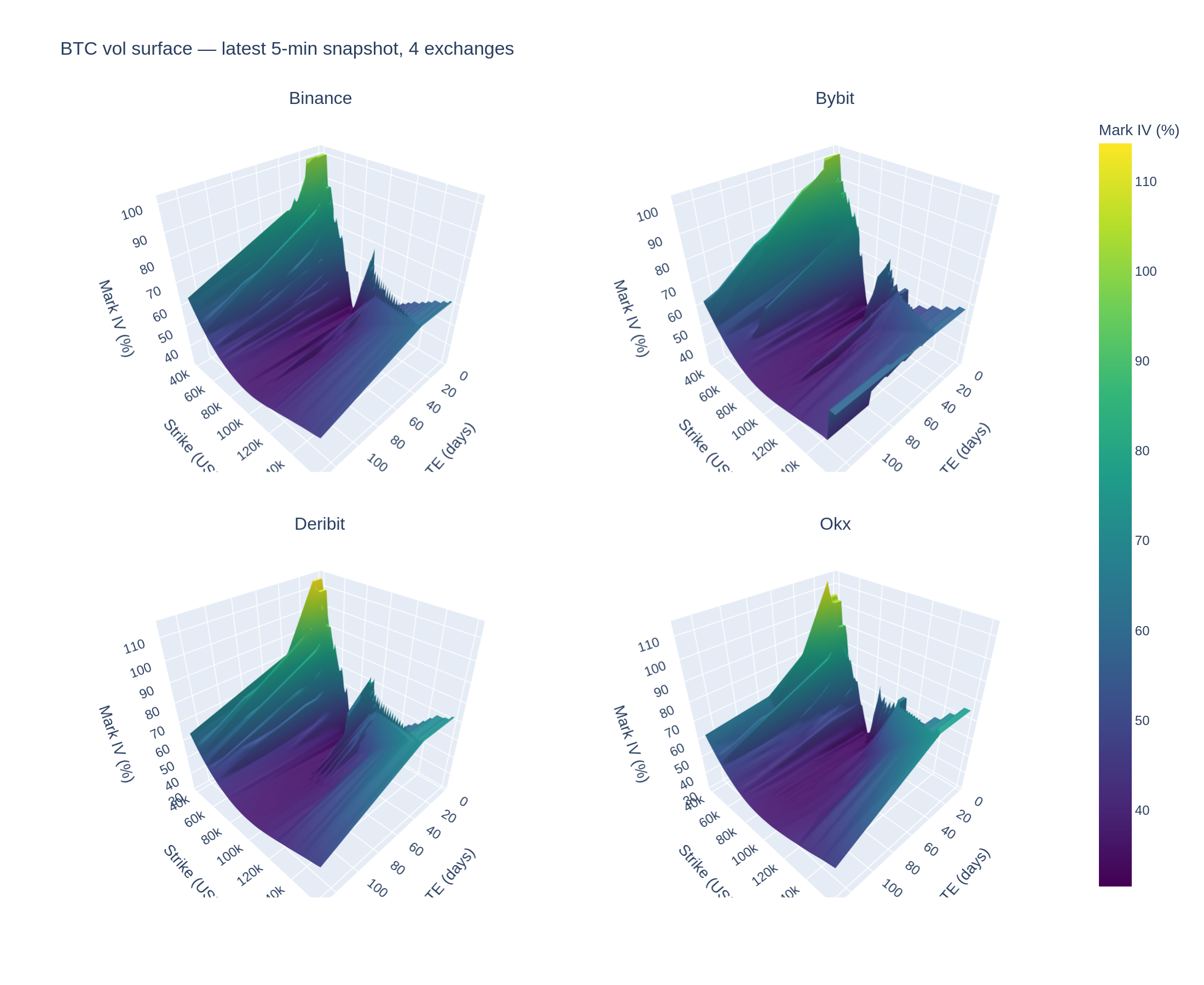
One Plotly `Surface` trace per exchange, laid out in a 2-column grid. The exchange list comes from the dataframe (so a query that returns only 3 venues for some asset still plots correctly), with a shared colour scale across all panels:

```python
exchanges = sorted(df_f['exchange'].unique())
n = len(exchanges)
cols = 2 if n > 1 else 1
rows = (n + cols - 1) // cols

fig = make_subplots(
    rows=rows, cols=cols,
    specs=[[{'type': 'surface'}] * cols for _ in range(rows)],
    subplot_titles=[e.title() for e in exchanges],
)
iv_min, iv_max = df_f['iv'].min(), df_f['iv'].max()
for i, ex in enumerate(exchanges):
    fig.add_trace(
        go.Surface(x=xx, y=yy, z=surface_for(ex), colorscale='Viridis',
                   cmin=iv_min, cmax=iv_max, showscale=(i == 0)),
        row=(i // cols) + 1, col=(i % cols) + 1,
    )
fig.show()
```

<figure><img src="/files/16H9JtjJR67hzit82Sed" alt="Four BTC implied-volatility surfaces — Binance, Bybit, Deribit, OKX"><figcaption><p>BTC implied-volatility surface on each venue — shared colour scale, latest 5-minute snapshot. The wing lift along the strike axis is the smile; the gentle rise along DTE is the term structure.</p></figcaption></figure>

## ATM term structure

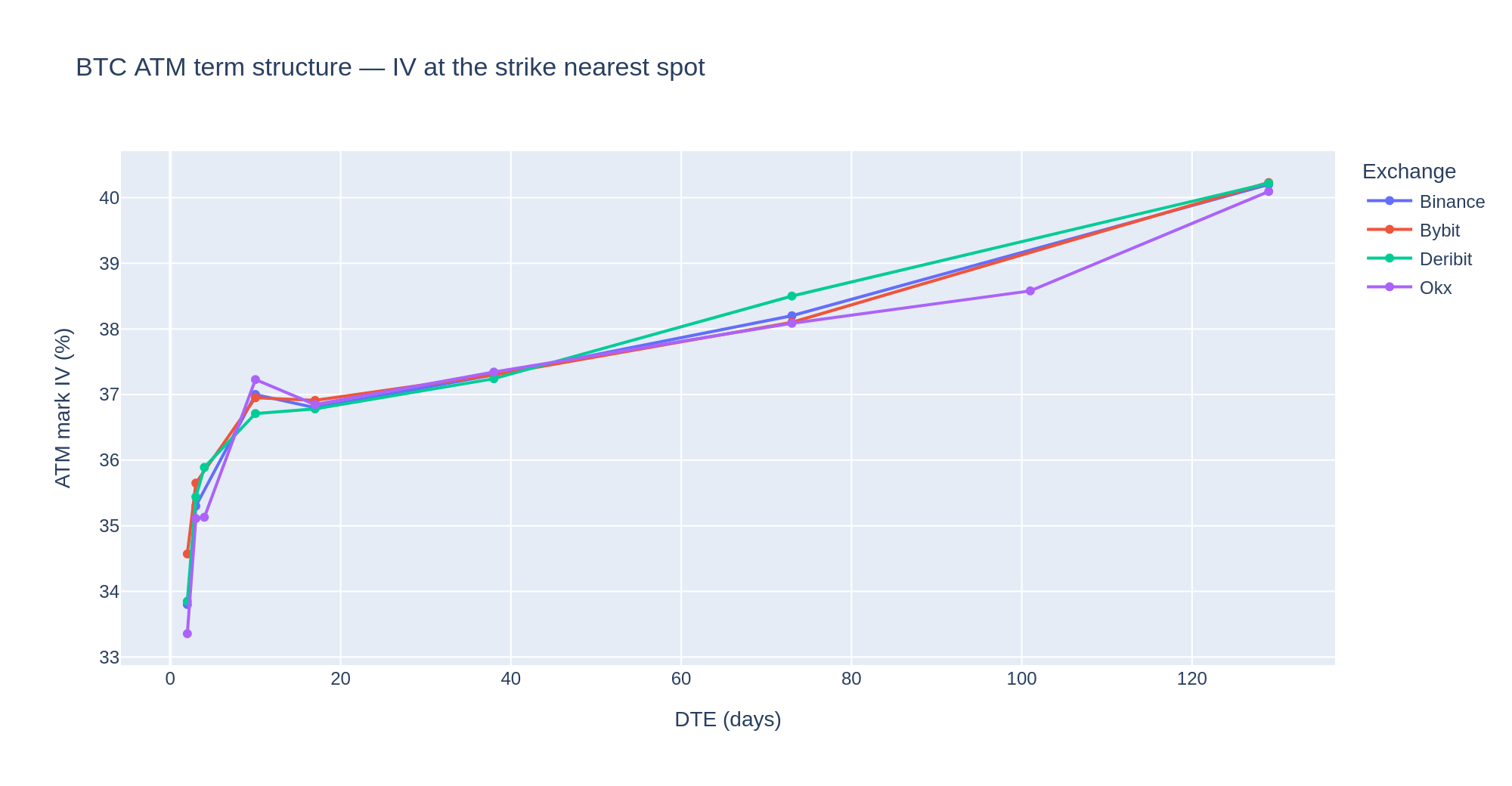
At-the-money IV as a function of time to expiry. `moneyness` comes from the query, so keeping the strike closest to spot for each `(exchange, expiry)` is just a sort + dedup — one line per venue:

```python
atm = (df.sort_values('moneyness')
         .drop_duplicates(['exchange', 'dte'])
         .sort_values(['exchange', 'dte']))

fig = go.Figure()
for ex in sorted(atm['exchange'].unique()):
    s = atm[atm['exchange'] == ex]
    fig.add_trace(go.Scatter(x=s['dte'], y=s['iv'],
                             mode='lines+markers', name=ex.title()))
fig.show()
```

<figure><img src="/files/8VCGDWt4Qu9OwOjAhJw3" alt="BTC ATM implied-volatility term structure across four venues"><figcaption><p>ATM mark IV vs DTE. An upward slope is contango (longer-dated vol richer); a downward slope is backwardation — the classic near-term event/stress signature.</p></figcaption></figure>

The four venues track each other tightly at ATM — this is the least-arbitrageable slice. Where they fan out is usually a venue carrying an expiry the others don't list.

## Volatility smile

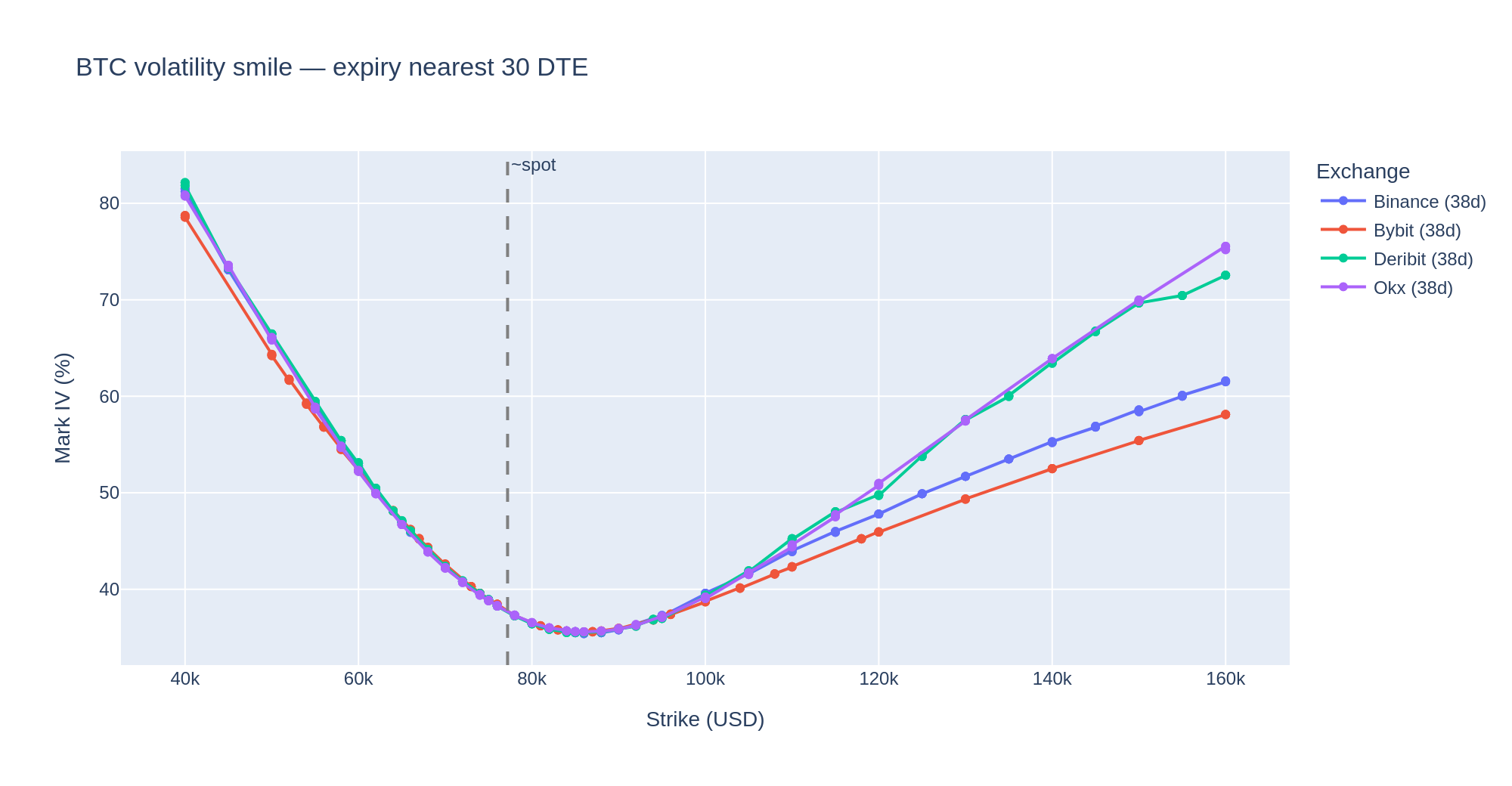
Fix the expiry, sweep the strike. Per venue, take the listed expiry closest to 30 DTE (they line up on the same date here), crop to the same strike band as the surface, and overlay all four:

```python
TARGET_DTE = 30
chosen = (df.assign(gap=(df['dte'] - TARGET_DTE).abs())
            .sort_values('gap')
            .drop_duplicates('exchange')[['exchange', 'dte']])
smile = (df.merge(chosen, on=['exchange', 'dte'])
           .query('strike >= @STRIKE_MIN and strike <= @STRIKE_MAX')
           .sort_values('strike'))

fig = go.Figure()
for ex in sorted(smile['exchange'].unique()):
    s = smile[smile['exchange'] == ex]
    fig.add_trace(go.Scatter(x=s['strike'], y=s['iv'], mode='lines+markers',
                             name=f"{ex.title()} ({int(s['dte'].iloc[0])}d)"))
fig.add_vline(x=df['spot'].median(), line_dash='dash', line_color='gray',
              annotation_text='~spot')
fig.show()
```

<figure><img src="/files/SsEuj5ODXpubVGDehkfv" alt="BTC volatility smile at ~30 DTE across four venues"><figcaption><p>Mark IV vs strike at the ~30 DTE expiry. Wing steepness flags tail pricing; a vertical gap between venues at the same strike is cross-venue dispersion.</p></figcaption></figure>

The smile bottoms out near spot and lifts on both wings. The call wing is where it gets interesting: a gap between venues at the same strike and expiry is a candidate arb — after netting funding, basis, and leg-out cost.

## Download

{% file src="/files/KTYKPk6k17st0OCM9FZT" %}
Jupyter notebook — the full pipeline from connection to all three plots.
{% endfile %}

Connection setup (host, credentials) at the top of the notebook follows the same template as [How to connect](/how-to-connect.md). Replace the placeholders with your provisioned values.


---

# Agent Instructions: Querying This Documentation

If you need additional information that is not directly available in this page, you can query the documentation dynamically by asking a question.

Perform an HTTP GET request on the current page URL with the `ask` query parameter:

```
GET https://docs.koinju.io/sql-cookbook/multi-exchange-vol-surface.md?ask=<question>
```

The question should be specific, self-contained, and written in natural language.
The response will contain a direct answer to the question and relevant excerpts and sources from the documentation.

Use this mechanism when the answer is not explicitly present in the current page, you need clarification or additional context, or you want to retrieve related documentation sections.